The bottom three layers of my thesis architecture handle the hard problems: virtual machine provisioning, the VirtualBox SDK, and a REST API for remote code execution. But none of that is visible to the people who actually use the system — instructors writing questions and students submitting answers. That interface is Layer 4: the Moodle plugin.
This post focuses on the application layer. How the Moodle plugin was built, how it fits into Moodle's extension model, and what the plugin looks like from the inside.
For the full four-layer architecture and the REST API beneath this layer, see Designing a secure automated grading system and Building a REST API to control VirtualBox programmatically.
The Abstraction Point
Before diving into Moodle specifics, the key design decision: Layer 3 exposes a REST API. Layer 4 consumes it over HTTP. That's the only contract between them.
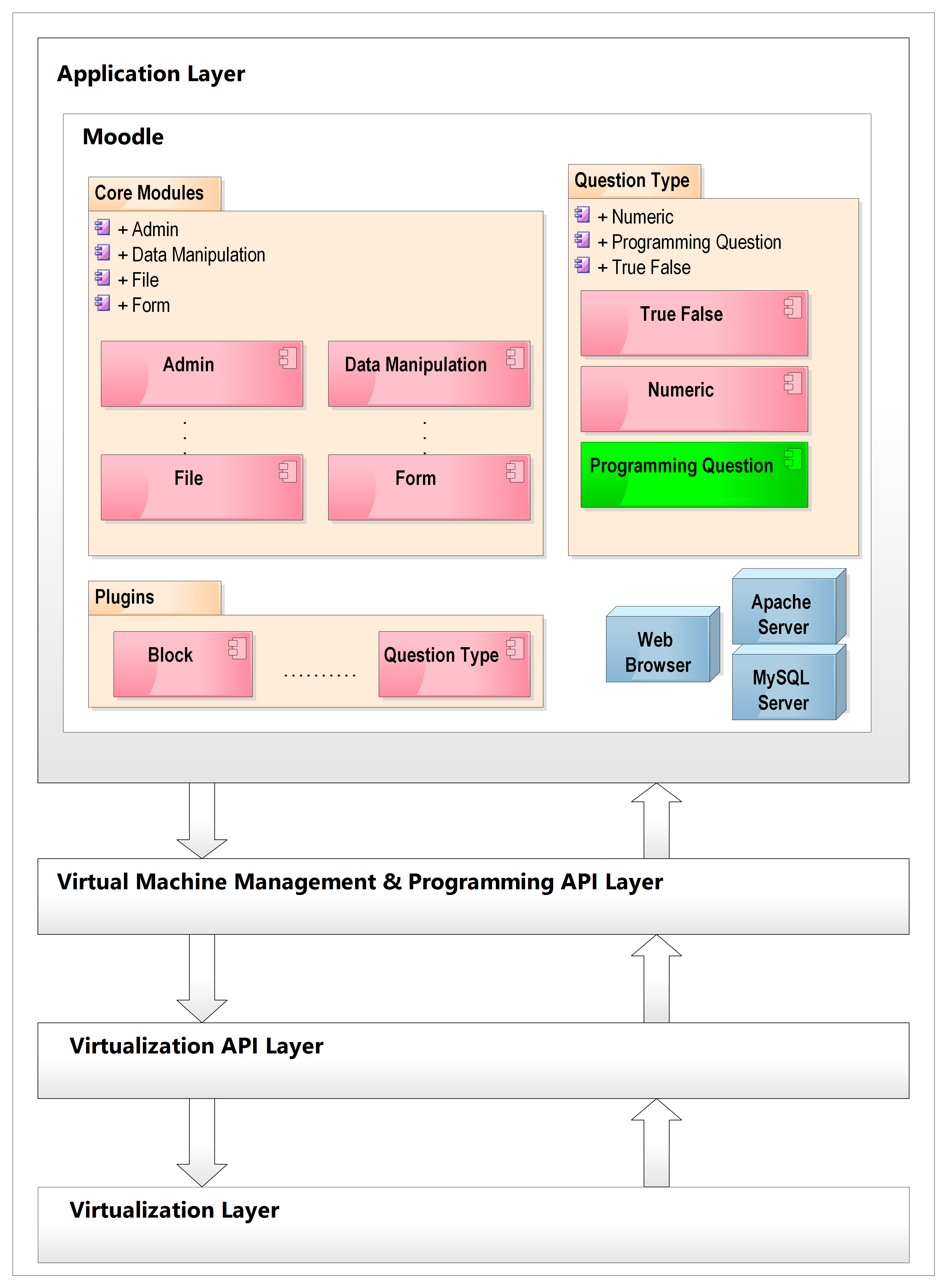 Application layer showing Moodle architecture with the Programming Question plugin consuming the REST API from Layer 3
This means Layer 4 doesn't have to be Moodle at all. The same REST API could be consumed by:
- Another e-learning platform (Sakai, ATutor, .LRN)
- A standalone web application
- A mobile app
- A desktop Java Swing application (which was also built as a proof of concept during the thesis)
The thesis prototype chose Moodle because it was the target platform, but the architecture doesn't depend on that choice.
How Moodle's Plugin System Works
Moodle is structured as a core application surrounded by plugins. The core provides infrastructure — courses, users, enrolment, the quiz engine — and plugins add specific functionality without modifying core code.
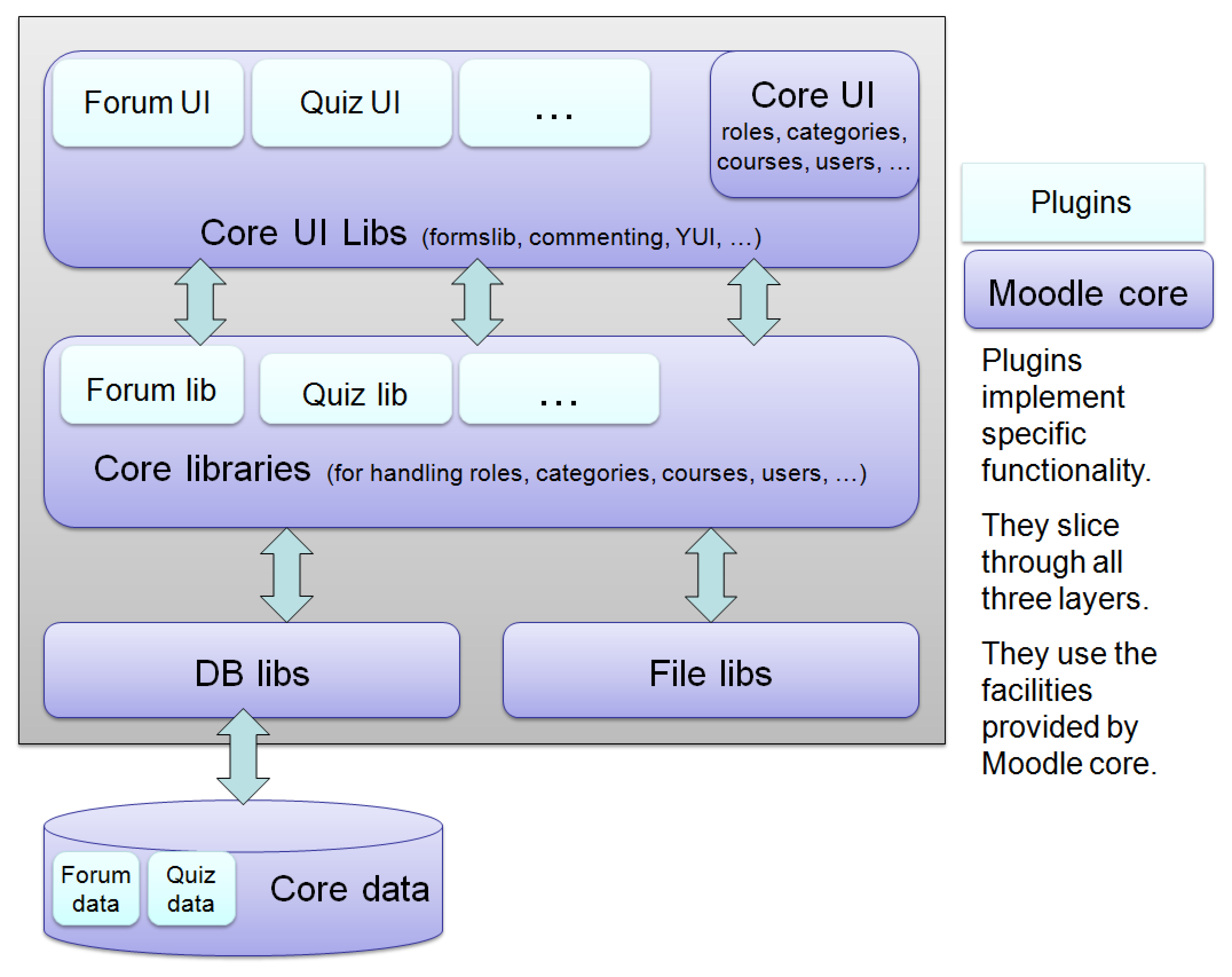 Moodle platform architecture — core services and the plugin ecosystem showing how question type plugins interact with the quiz engine, gradebook, and database
A Moodle plugin is physically just a folder of PHP files placed at the correct path. The plugin type and name determine the path. For a question type plugin named programming, the path is:
moodle/question/type/programming/
Moodle discovers and installs it automatically from there. The folder name becomes the plugin identifier used throughout Moodle's APIs and database.
Plugin Folder Structure
Every Moodle question type plugin follows a standard structure. Each file has a defined role.
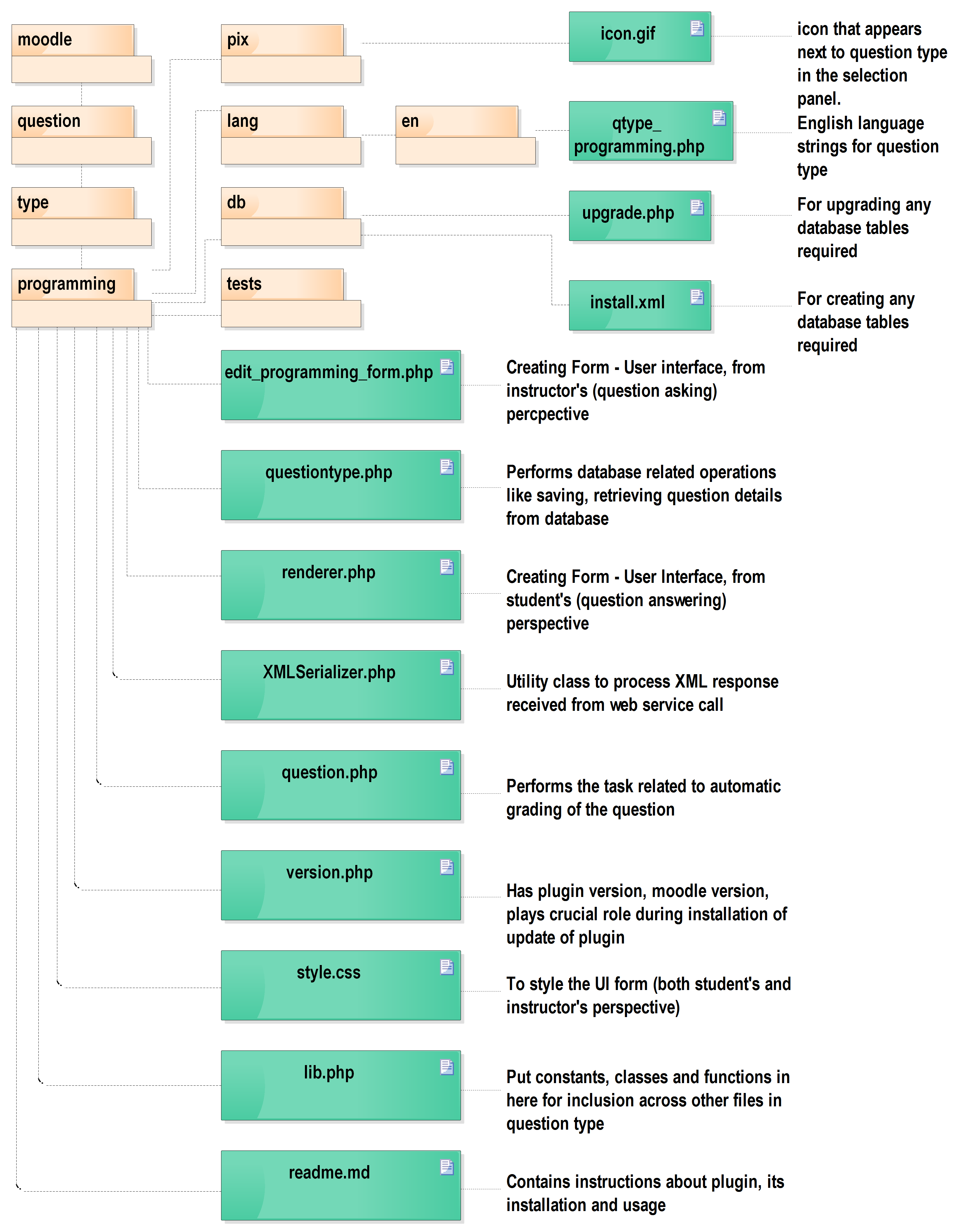 Programming Question plugin folder structure — showing the PHP files, their purpose, and how the plugin integrates with Moodle's quiz and question engine
The key files:
| File | Role |
|---|---|
edit_programming_form.php | Instructor-facing question editor UI |
questiontype.php | Database persistence (save/load question data) |
question.php | Grading logic and runtime question state |
renderer.php | Student-facing quiz UI |
lib.php | Shared constants and hooks |
version.php | Plugin version and Moodle compatibility declaration |
db/install.xml | Custom database table definitions |
db/upgrade.php | Database migration for plugin updates |
lang/en/qtype_programming.php | English language strings |
XMLSerializer.php | Utility for XML ↔ PHP object conversion (Layer 3 API uses XML) |
PHP Class Breakdown
edit_programming_form.php
Defines qtype_programming_edit_form, extending Moodle's question_edit_form. This is the instructor-facing form:
- Text area for the question description
- Code editor for the source code template shown to students
- Fields for the reference solution (compiled and executed server-side to generate expected output)
- Input/output pair fields for grading: what input to feed the student's code, what output to expect
- Compile and Execute buttons that call the REST API from the browser (via Moodle's AJAX framework)
Internally extends formslib.php from Moodle core for form rendering, validation, and submission handling.
questiontype.php
Defines qtype_programming, extending question_type. Responsible for:
- Saving question data to the database when the instructor submits the form
- Loading it back when the question is edited or a student attempts it
- Using Moodle's core
DBlibrary for DML operations on the custom tables
question.php
Defines qtype_programming_question, extending question_graded_automatically_with_countback. This is the runtime question object:
- Holds all question data in memory during a quiz attempt
- Contains the
grade_response()method — receives a student's submitted code, calls the REST API to compile and execute it on the assigned VM, compares stdout with the expected output, and returns a fraction between 0 and 1 for the grade - Acts as the bridge between the student's submission and the execution infrastructure
renderer.php
Defines qtype_programming_renderer, extending qtype_renderer. Student-facing view:
- Renders the question text and code template inside Moodle's quiz interface
- Shows a code editor pre-filled with the instructor's template
- Displays compilation and execution feedback after each attempt
- All styling uses Moodle's existing CSS classes — the plugin adds no custom styles
XMLSerializer.php
An external PHP utility (not part of Moodle's framework) for converting PHP objects to XML and back. Necessary because the Layer 3 REST API accepts and returns XML. The plugin uses it to:
- Serialize the question object (class name, source code, action flag) into XML before calling the API
- Deserialize the XML response (compilation errors, execution output) back into PHP objects for display
This is the only place in the plugin where the XML contract with Layer 3 is visible.
Database Design
Two additional tables were created beyond what Moodle's question engine already provides:
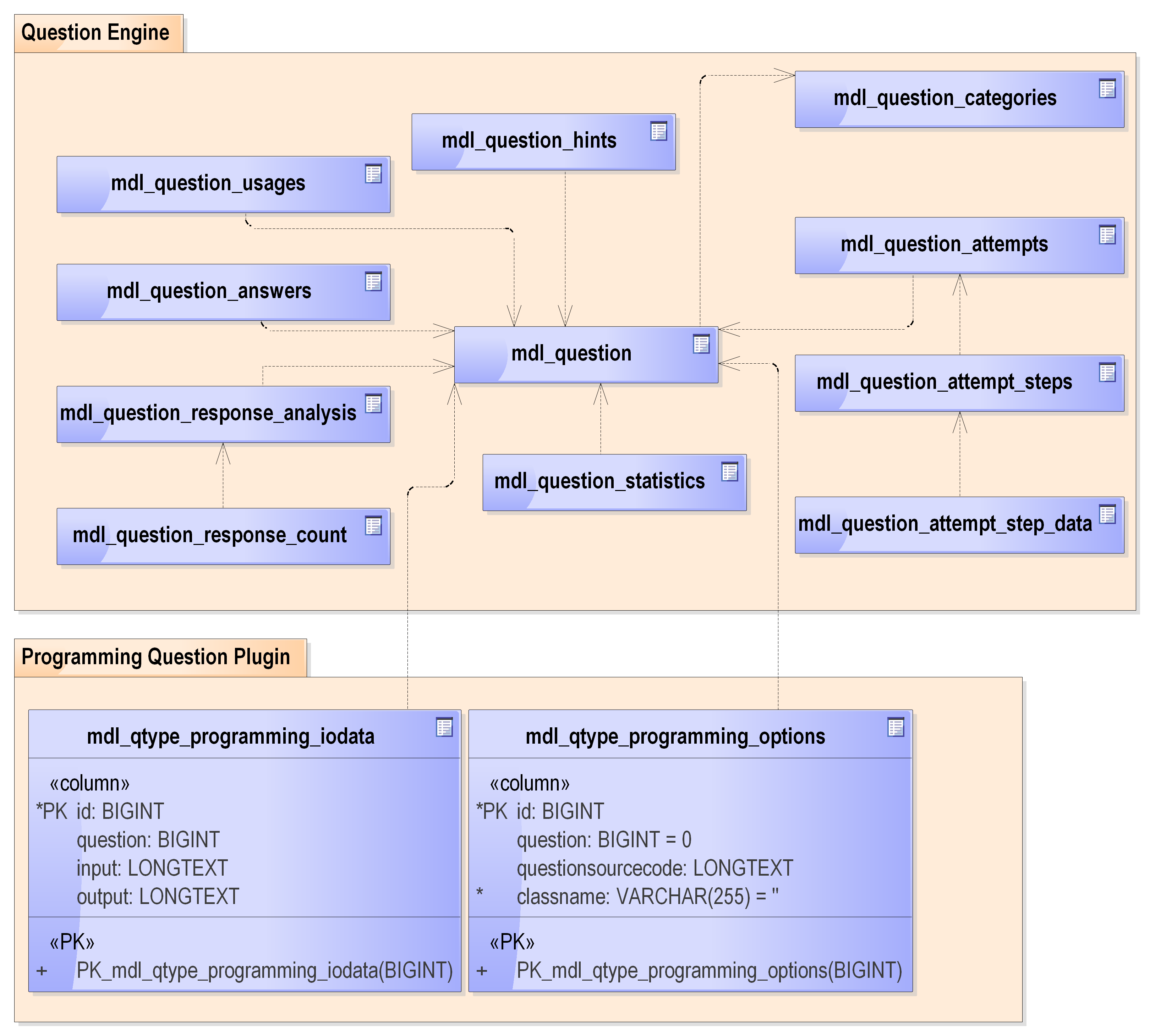 Moodle Programming Question plugin database design — custom tables linking to Moodle's core question tables for storing source code, class names, and expected input/output pairs
mdl_qtype_programming_options
Stores per-question configuration:
| Column | Type | Purpose |
|---|---|---|
id | PK | Unique record identifier |
question | FK → mdl_question | Links to the core question record |
questionsourcecode | Text | Instructor's reference source code |
classname | Text | Public class name (needed for javac) |
mdl_qtype_programming_iodata
Stores expected input/output pairs for grading:
| Column | Type | Purpose |
|---|---|---|
id | PK | Unique record identifier |
question | FK → mdl_question | Links to the core question record |
input | Text | Input to feed to the program (visible to student) |
output | Text | Expected output for grading (hidden from student) |
The rest — question text, category, marks, timestamps — is stored in Moodle's core mdl_question table and managed by the question engine. The plugin only stores what is specific to programming questions.
The Communication Flow
When an instructor saves a question with a reference solution, and when a student submits their code, the communication with Layer 3 follows the same steps:
1. Moodle form submitted
   ↓
2. qtype_programming_edit_form (or question.php) captures the data
   ↓
3. XMLSerializer serialises the PHP question object to XML:
   <programDetails>
     <className>BubbleSort</className>
     <sourceCode>public class BubbleSort { ... }</sourceCode>
     <action>COMPILE</action>
   </programDetails>
   ↓
4. HTTP POST to Layer 3 REST API:
   POST /program/compile
   Body: XML
   ↓
5. Layer 3 SSHs the XML into the allocated VM, runs the utility JAR
   ↓
6. Result returned as XML:
   <compilationResult>
     <status>SUCCESS</status>
     <errors/>
   </compilationResult>
   ↓
7. XMLSerializer deserialises back to PHP object
   ↓
8. Result rendered in Moodle UI
The plugin has no knowledge of VMs, SSH, or VirtualBox. It only knows: there is a URL, send XML, expect XML back.
Instructor and Student Experience
From the instructor's side, writing a programming question looks similar to writing any other Moodle question — except the form has a code editor, compile/execute buttons, and input/output pair fields. The instructor writes the reference solution, compiles it to verify it works, and saves.
From the student's side, the quiz looks like any Moodle quiz. The programming question shows a description and a code template in an editor. The student writes their solution, submits, and sees a grade. No indication of what runs behind it.
What Would Change Today
The architecture of the plugin is sound — the layer separation, the REST API abstraction, and the Moodle extension model all hold. The implementation details would change:
- XML → JSON for the Layer 3 API contract (simpler serialisation, no
XMLSerializer.phpneeded) - The code editor in the UI would use a proper editor like CodeMirror or Monaco rather than a plain
<textarea> - Unit tests would be written (skipped during the prototype phase due to time constraints)
- The VM assignment logic (allocating a specific VM to a specific student) would be made explicit rather than implicit in the question's runtime state
The PHP plugin structure, Moodle extension points, and the HTTP boundary between Layer 4 and Layer 3 would remain exactly as designed.