Most automated grading systems for programming assignments share the same blind spot: they execute student code on the same machine that runs the grading platform. This works until it doesn't — and when it fails, it fails badly.
This post walks through the architecture I designed for my Master's thesis at FH Hagenberg in 2015: a Moodle plugin that evaluates Java programming assignments by routing all code execution through isolated virtual machines. The design decisions are still relevant for anyone building systems that execute untrusted code at the application layer.
The Problem to Solve
The system needed to:
- Let instructors write programming questions with a code template and expected output
- Let students write and submit Java solutions inside Moodle
- Automatically compile and execute both, compare outputs, and assign grades
- Do all of this without running untrusted code on the host machine
The last requirement is the hard one. For the threat model and why naive approaches fail, see the earlier post on executing untrusted code safely.
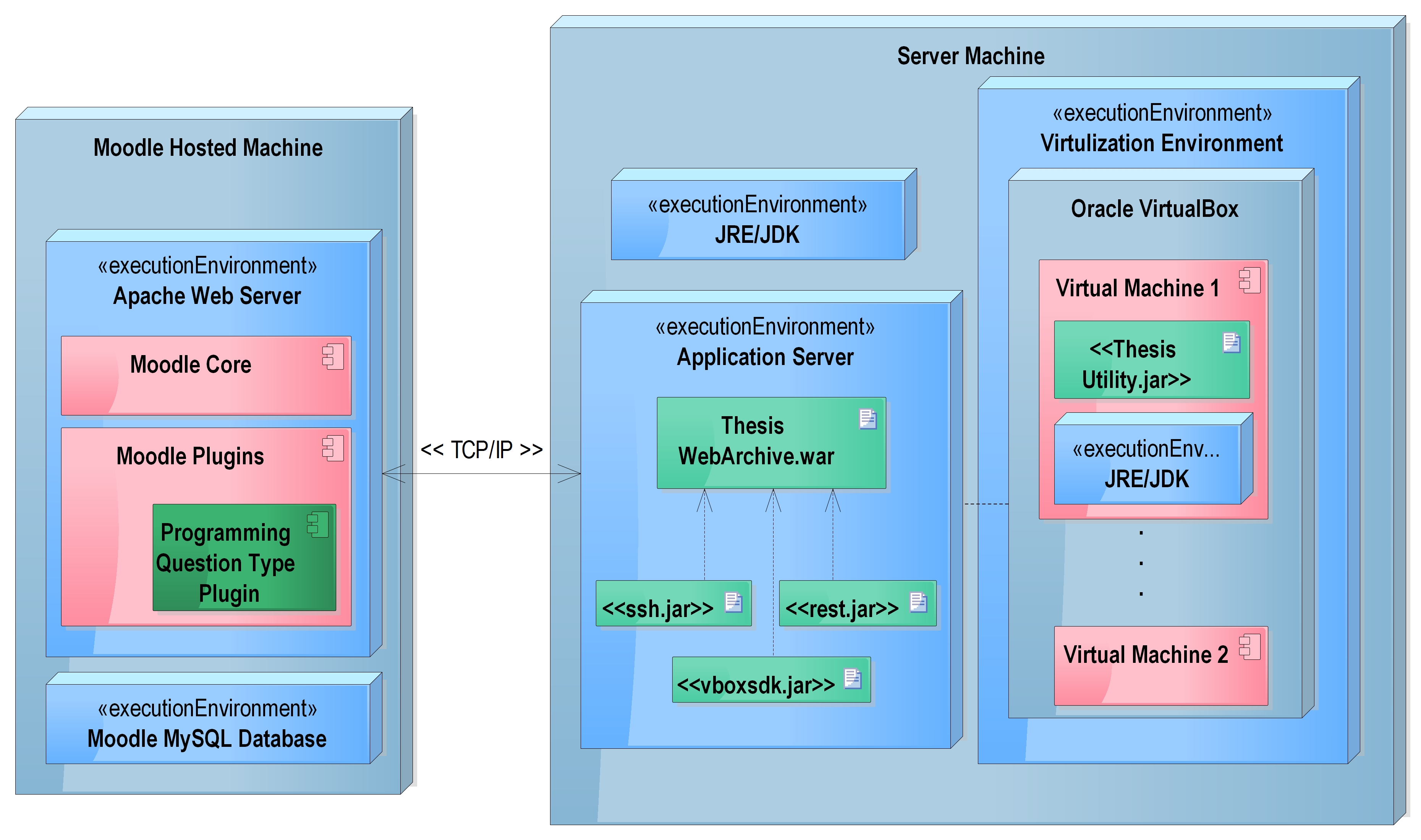 Deployment overview — Moodle platform server, VirtualBox host with vBoxWebSrv, and per-student SliTaz Linux VMs as independent deployment units connected over the same network
Four-Layer Architecture
The system is divided into four independent layers, each with a single responsibility.
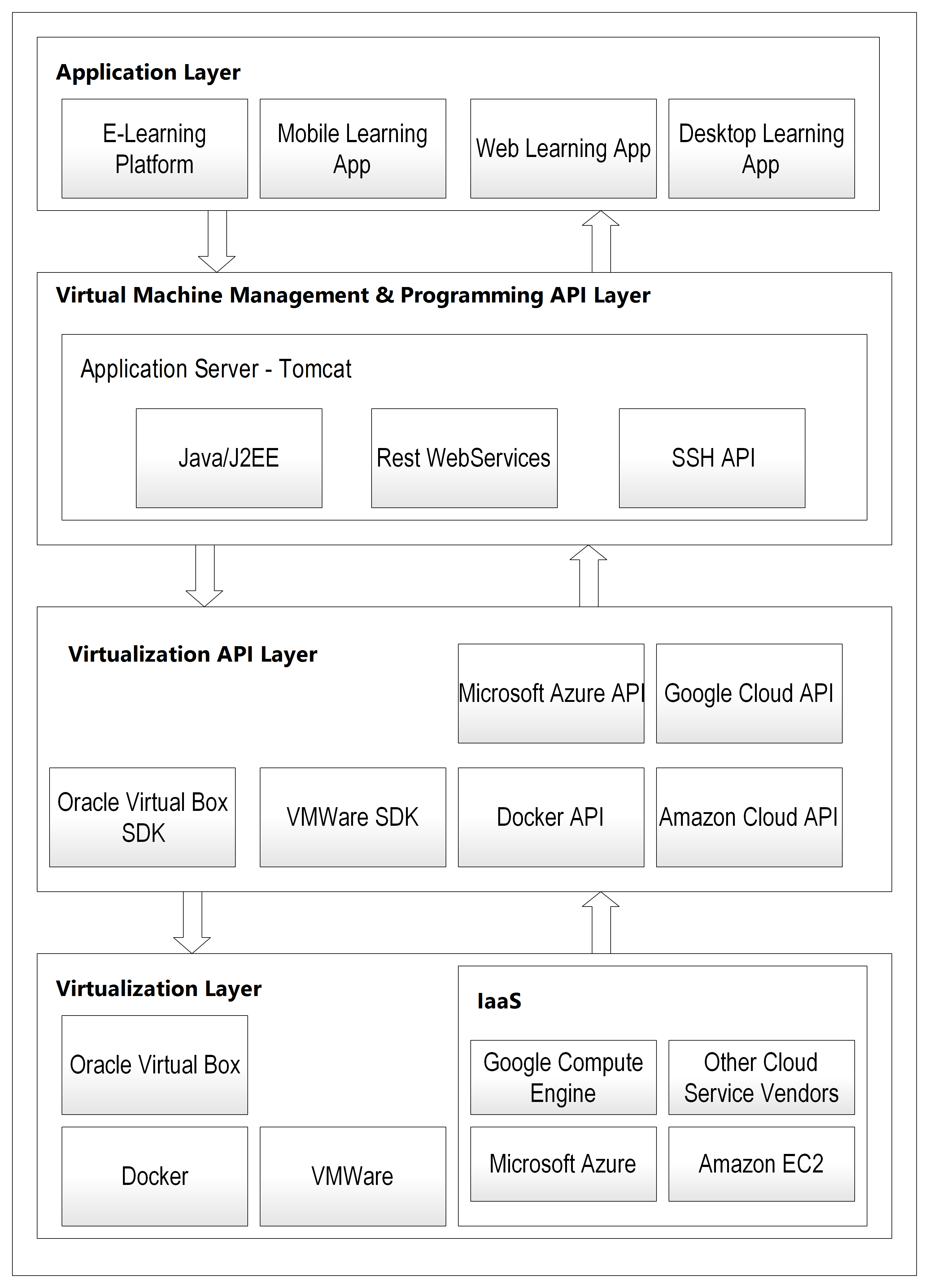 Overall four-layer system architecture — virtualization at the base, VBox SDK above it, REST management API in the middle, and Moodle at the top. Every layer is independent and replaceable
Layer 1 — Virtualization Layer Hosts Oracle VirtualBox with multiple minimal Linux VMs (SliTaz Linux, ~30MB ISO, 64MB RAM, 1GB HDD per VM). Each VM has only what it needs: SSH powered by Dropbear, JDK, and a small utility JAR for compiling and executing Java programs. Nothing else. No web server, no database, no shared filesystem with the host or other VMs.
Layer 2 — Virtualization API Layer
The Oracle VirtualBox SDK (vboxjws.jar) — a Java library that exposes programmatic control over VMs. This layer is vendor-provided, not custom code. It maps directly to what VirtualBox's desktop application does, but accessible via Java API calls. Every competing technology in Layer 1 (VMware, Docker, AWS EC2) ships an equivalent SDK — there is always a one-to-one pairing between the virtualization technology and its API layer.
Layer 3 — VM Management and Programming API The core of the system. A Java/J2EE web application deployed on Tomcat that exposes a REST API. It uses the VirtualBox SDK from Layer 2 to control VMs, and SSH to transfer files and run programs inside them.
Layer 4 — Application Layer The Moodle plugin. It makes HTTP calls to Layer 3 and renders results to students and instructors. It has no knowledge of what happens in the layers below — VMs, SSH, VirtualBox are all invisible to it.
The key design principle: each layer is independently replaceable. Swap VirtualBox for Docker in Layers 1 and 2, and Layer 3 adapts its SDK calls. Layer 4 never changes.
Layer 3 in Detail: The REST API
This is where all the business logic lives. The API has two components.
VM Management Component
Handles the lifecycle of virtual machines.
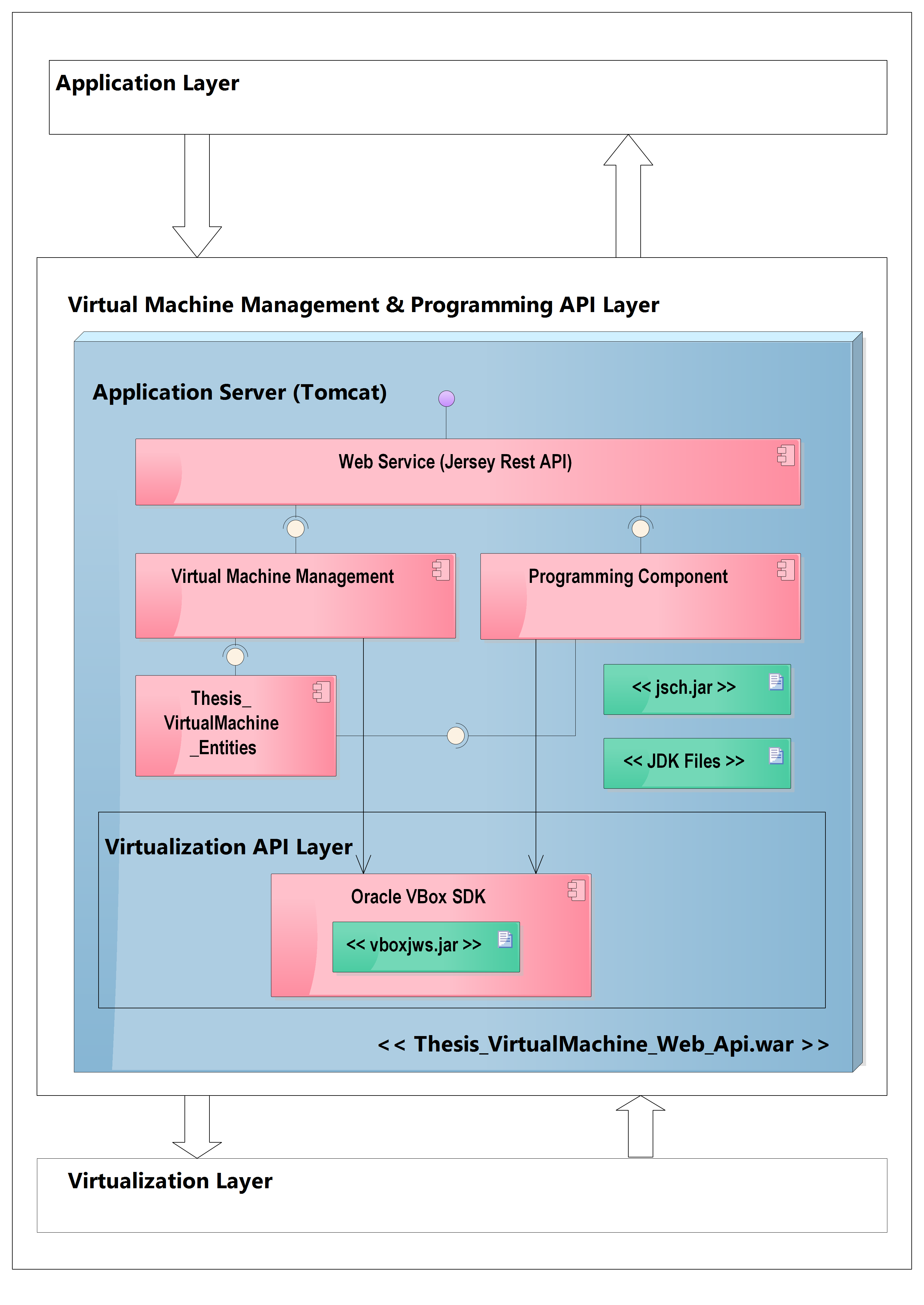 Virtual Machine Management and Programming API layer — Layer 3 and Layer 2 combined, showing the internal Web Service, VM Management Component, Programming Component, and VM Entity classes
GET  /vm/list                    → list all VMs and their status
GET  /vm/{name}                  → get VM details (IP, state, OS)
POST /vm/{name}/start            → boot the VM
POST /vm/{name}/stop             → shut down the VM
POST /vm/clone                   → clone a base VM for a new student
POST /vm/{name}/copyfile         → copy source file into VM via SSH
DELETE /vm/{name}                → delete the VM
The internal class structure separates concerns across two packages:
com.fhooe.mc.thesis.virtualmachine.restapi— Jersey REST endpoints, handles request/response marshalling and XML un-marshalling into entitiescom.fhooe.mc.thesis.virtualmachine.business— business logic, initialises the VirtualBox connection, accessesIMachineandISessioninterfaces from the SDK, performs the actual VM operations
A typical clone sequence: REST endpoint receives the request → passes to business layer → business layer calls VBox SDK to locate the base machine → initiates full clone → waits for completion → returns new VM details.
Programming Component
Handles compilation and execution of Java source code inside a VM:
POST /program/compile            → compile Java source on target VM
POST /program/execute            → execute compiled class on target VM
The flow for a student submission:
- Moodle plugin calls
POST /vm/{name}/copyfilewith the source code in XML format - The business layer SSHs into the VM and places the file at the expected location
- Moodle plugin calls
POST /program/compilewith the VM name - The business layer SSHs into the VM and invokes the utility JAR
- The utility extracts the source from XML, creates a
.javafile, runsjavac - Compilation result (success/errors with line and column numbers) is returned in XML format
- If successful, Moodle calls
POST /program/execute - The utility runs
javaand captures stdout/stderr - Result is returned to Moodle for grading
The XML format for source transfer:
<programDetails>
  <className>StudentSolution</className>
  <sourceCode>
    public class StudentSolution {
        public static void main(String[] args) {
            System.out.println("Hello World");
        }
    }
  </sourceCode>
  <action>COMPILE</action>
</programDetails>
Layer 1 in Detail: The Virtualization Layer
Each virtual machine is a clone of a single base image: SliTaz Linux running on Oracle VirtualBox.
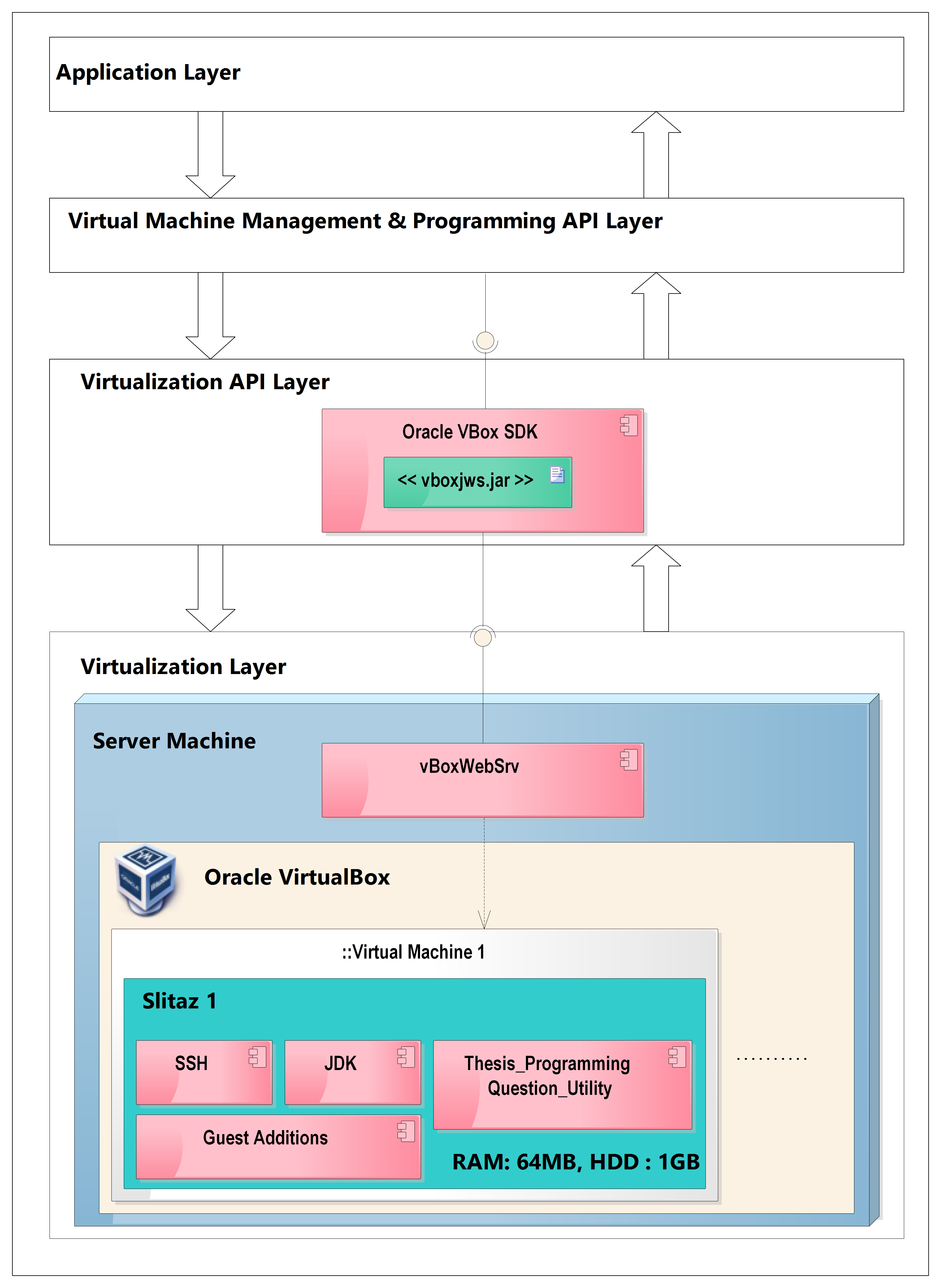 Virtualization layer detail — Oracle VirtualBox host running vBoxWebSrv, with multiple SliTaz Linux VMs each containing JDK, SSH (Dropbear), VBox Guest Additions, and the utility JAR
SliTaz was chosen for its minimal footprint: ~30MB ISO, ~100MB installed root filesystem, SSH via Dropbear, boot time of 2–3 seconds. Minimal VM configuration: 64MB RAM, 1GB HDD. The smaller the VM, the faster the clone and boot cycle. VirtualBox Guest Additions must be installed so the SDK can retrieve each VM's IP address — without them, the VBox SDK cannot resolve the machine's network address and SSH becomes impossible.
This process runs once: build one working base image, then clone it for every student.
The Utility Application
A small JAR installed on each VM that processes the XML file dropped by the SSH transfer, compiles or executes the Java source, and writes results back to a known location for SSH retrieval.
/vm-tools/
  ├── utility.jar          ← compilation/execution engine
  ├── input/               ← SSH drops XML files here
  └── output/              ← results written here, SSH reads back
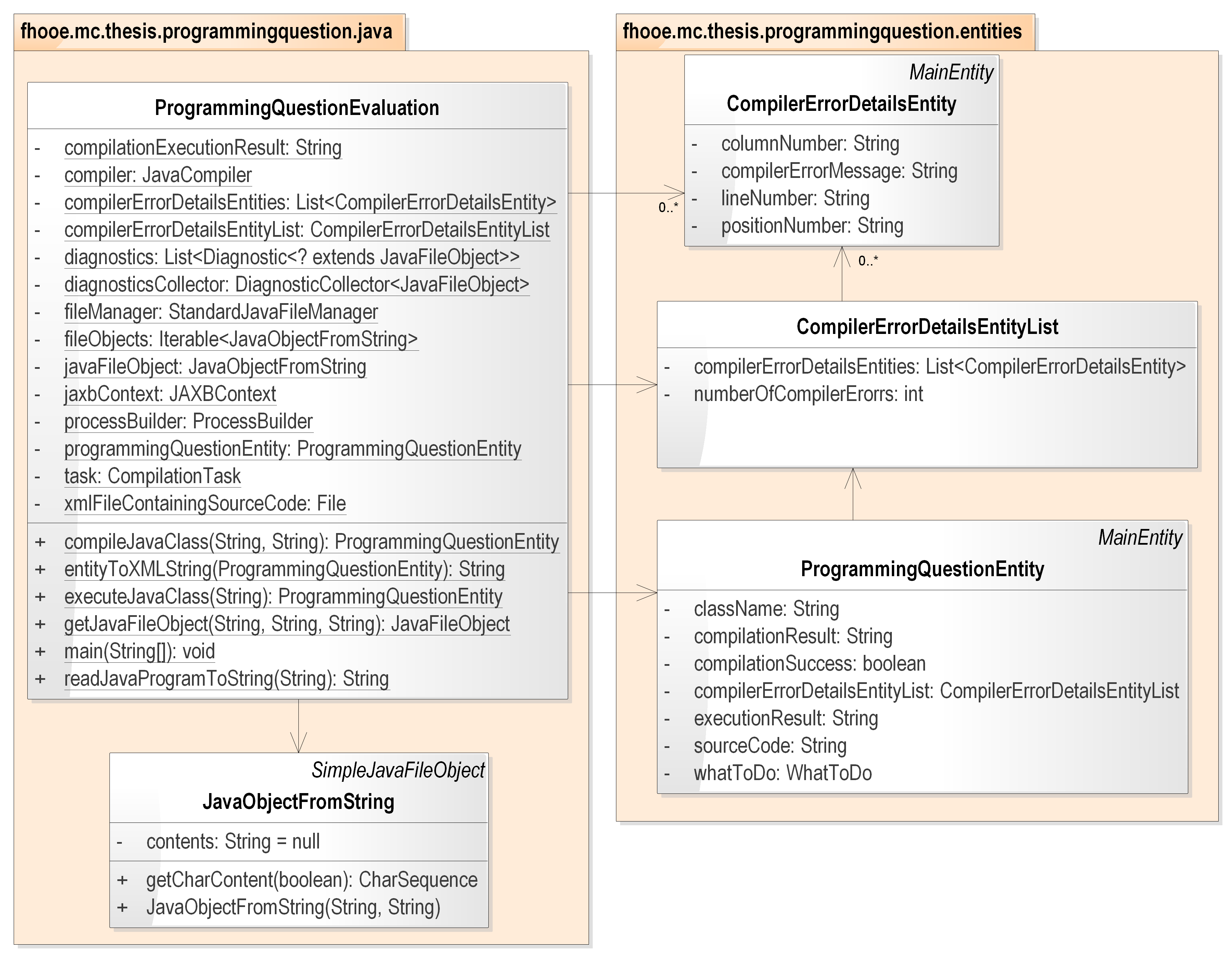 Utility application class diagram — ProgrammingQuestionEvaluation orchestrates compilation and execution using JavaCompiler, DiagnosticCollector, ProcessBuilder, and JAXB for XML marshalling
The utility uses JavaCompiler and DiagnosticCollector from the JDK for compilation (preserving exact line and column numbers in error output), ProcessBuilder for execution, and JAXB for XML marshalling. The design is intentionally extensible: supporting a second language (C, Python) would mean adding one more utility JAR — the REST API and Moodle plugin would not change.
This indirection matters: the REST API never runs javac or java directly. It copies a file and invokes a JAR. The JAR handles all compilation logic, error formatting, and output capture. This separation means Layer 3 has no language-specific knowledge.
Layer 4: The Moodle Plugin
A PHP-based Moodle question type plugin that adds "Programming Question" as a question type in Moodle's quiz system.
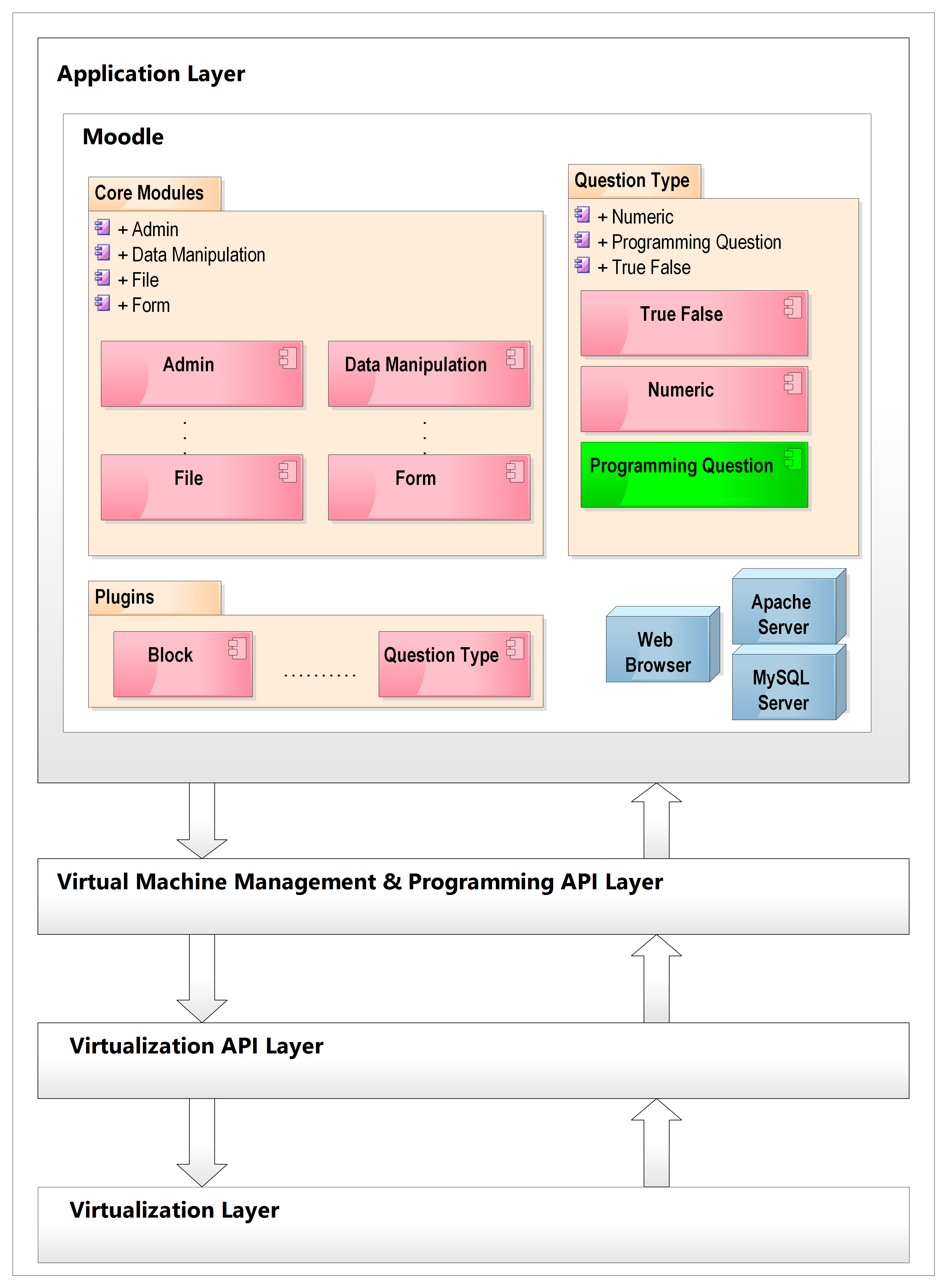 Application layer — Moodle architecture with the Programming Question plugin (in green) consuming the REST API from Layer 3. Arrows show the direction of data flow between layers
From the instructor's perspective:
- Write a question description and code template (scaffolding for students)
- Provide a reference solution with expected input/output pairs for grading
- Mix programming questions with MCQ, true/false, and other question types in the same Moodle quiz
From the student's perspective:
- See the question and template in the Moodle quiz interface
- Write their solution in a code editor
- Submit — grading happens automatically and results appear as a standard Moodle grade
The plugin is structured as a standard Moodle question type: edit_programming_form.php handles the instructor UI, question.php holds the grading logic, renderer.php renders the student-facing view, and questiontype.php handles persistence. Two additional database tables store the question source code and expected input/output pairs.
The plugin consumes the REST API entirely transparently. Instructors and students never know VMs exist.
What the Architecture Gets Right
Separation of concerns — each layer has one job. The Moodle plugin manages the quiz UX. The REST API manages VM lifecycle and code execution. VirtualBox manages VM infrastructure. None of these bleed into each other.
Replaceability — the Layer 3 REST API contract (URL structure, request/response format) is stable regardless of what's in Layers 1 and 2. You could swap VirtualBox for Docker or AWS EC2 without changing the Moodle plugin at all.
Blast containment — the most important property. Student code runs in a dedicated VM. Damage is contained. The host, the Moodle database, other students' VMs — all unaffected.
Auditability — every operation goes through the REST API. Every compilation, execution, clone, and deletion is logged at the API layer. You have a complete record of what ran, when, and on which VM.
What It Would Do Differently Today
The architecture is sound. The implementation details would change:
- VirtualBox → Docker containers (faster startup, lighter weight, better resource limits via cgroups)
- Jersey REST → Spring Boot (better ecosystem, easier testing)
- SSH file transfer → Docker volume mounts or container file copy API
- Manual XML format → JSON
- Tomcat → embedded server in Spring Boot fat JAR
The four-layer separation, the REST API contract, and the blast-containment model all stay. See the companion post From VirtualBox to Docker for the full modernisation walkthrough.