When I built the automated grading system for my Master's thesis, one of the core engineering challenges was this: how do you control virtual machines programmatically from a web application?
Oracle VirtualBox has a desktop GUI for managing VMs. But we needed something a Moodle PHP plugin could call over HTTP — not a desktop application. The solution was to wrap the VirtualBox SDK in a REST API, giving any application full lifecycle control over VMs through simple HTTP calls.
This post covers how that REST API was designed and built.
Why a REST API
The system architecture had four layers, with the Moodle plugin at the top and VirtualBox at the bottom. The plugin is PHP. VirtualBox is controlled via a Java SDK. These two cannot communicate directly.
A REST API in the middle solves this cleanly:
Moodle Plugin (PHP)
    ↓ HTTP calls
REST API (Java/Tomcat)
    ↓ VirtualBox SDK (vboxjws.jar)
Oracle VirtualBox
    ↓ runs
Virtual Machines (SliTaz Linux)
The REST API becomes a language-agnostic interface. Any client — PHP, Python, mobile app — can control VMs without knowing anything about the VirtualBox SDK. This is the same pattern used by cloud providers like AWS EC2, which expose VM management through HTTP APIs regardless of the underlying hypervisor.
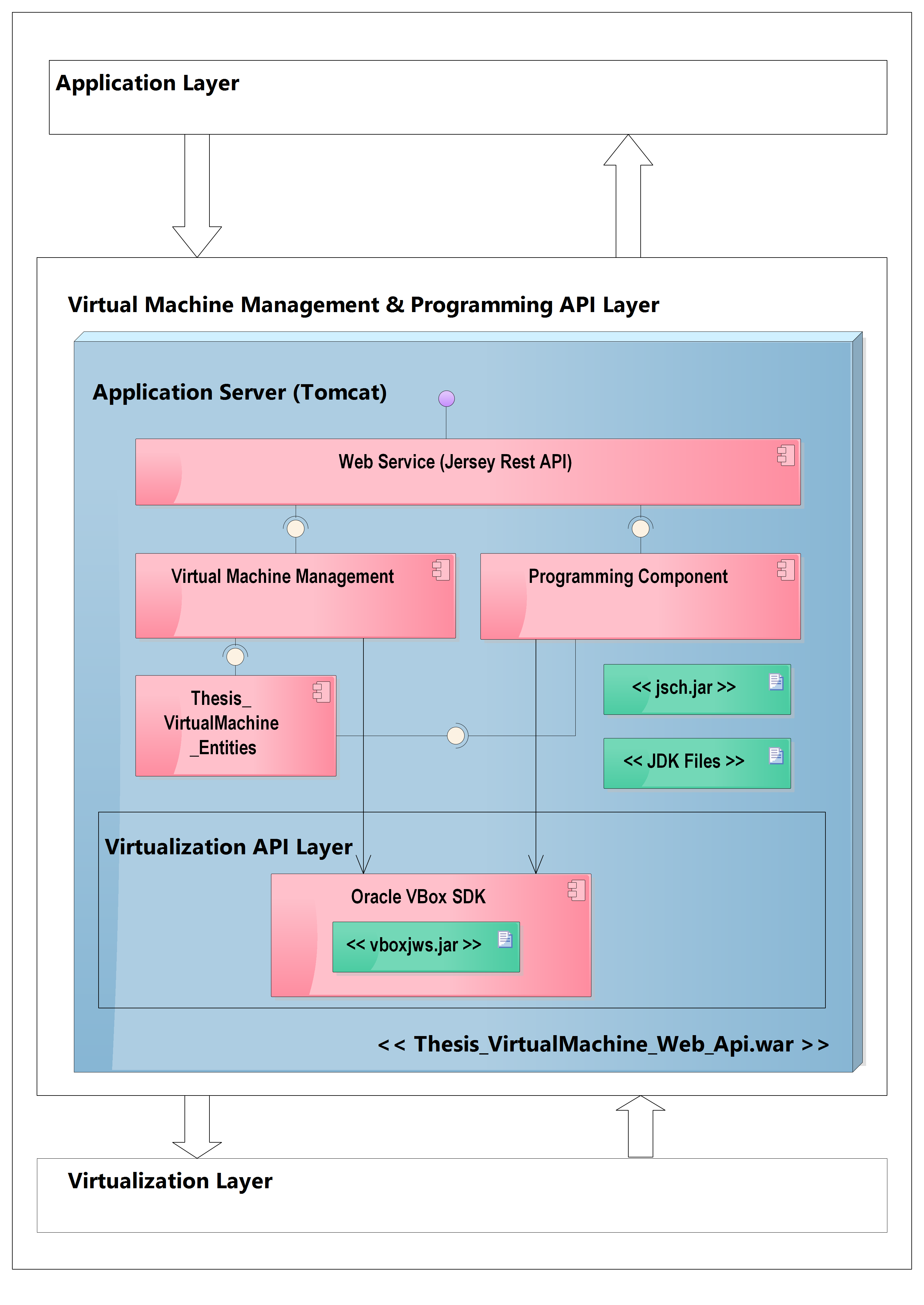 Layer 3 and Layer 2 detail — Web Service, VM Management Component, Programming Component, and VM Entities bundled into a single .war deployed on Tomcat, with the VBox SDK in Layer 2 below
The VirtualBox SDK
Oracle VirtualBox ships with vboxjws.jar — a Java library that exposes the full VirtualBox API. Before the REST API can use it, VirtualBox must be running with its web service enabled:
# Start VBoxWebSrv on the machine where VirtualBox is installed
vboxwebsrv --host 0.0.0.0 --port 18083
This starts a SOAP web service that the SDK connects to. From Java:
VirtualBoxManager manager = VirtualBoxManager.createInstance(null);
manager.connect("http://192.168.1.100:18083", "", "");
IVirtualBox vbox = manager.getVBox();
Once connected, vbox gives you access to all VMs installed on that VirtualBox instance.
Core API Endpoints
The REST API exposes two groups of operations — VM management and code execution.
VM Management
List all virtual machines:
GET /vm/list
Returns name, state (running/stopped), OS type for each VM.
Get VM details:
GET /vm/{name}
Returns IP address (if running), state, OS name, memory.
Start a VM:
POST /vm/{name}/start
Internally:
IMachine machine = vbox.findMachine(name);
ISession session = manager.getSessionObject();
IProgress progress = machine.launchVMProcess(
    session, "headless", null
);
progress.waitForCompletion(30000); // wait up to 30 seconds
The headless parameter means no GUI — the VM boots but shows no desktop. Critical for server environments.
Stop a VM:
POST /vm/{name}/stop
IMachine machine = vbox.findMachine(name);
ISession session = manager.getSessionObject();
machine.lockMachine(session, LockType.Shared);
IConsole console = session.getConsole();
console.powerDown();
Clone a VM:
POST /vm/clone
Body: { "sourceName": "base-vm", "cloneName": "student-42" }
This is the most important operation. Every student gets a clone of the base VM:
IMachine source = vbox.findMachine(sourceName);
IMachine clone = vbox.createMachine(
    null, cloneName, null, "Linux", null
);
IProgress progress = source.cloneTo(
    clone,
    CloneMode.MachineState,
    null
);
progress.waitForCompletion(120000); // cloning takes time
clone.saveSettings();
vbox.registerMachine(clone);
The clone is a full copy of the base VM — same OS, same tools, same utility application. It boots independently and can be destroyed without affecting the original.
Delete a VM:
DELETE /vm/{name}
Used when a student finishes or when a VM is damaged by malicious code:
IMachine machine = vbox.findMachine(name);
List<IMedium> media = machine.unregister(
    CleanupMode.DetachAllReturnHardDisksOnly
);
IProgress progress = machine.deleteConfig(media);
progress.waitForCompletion(60000);
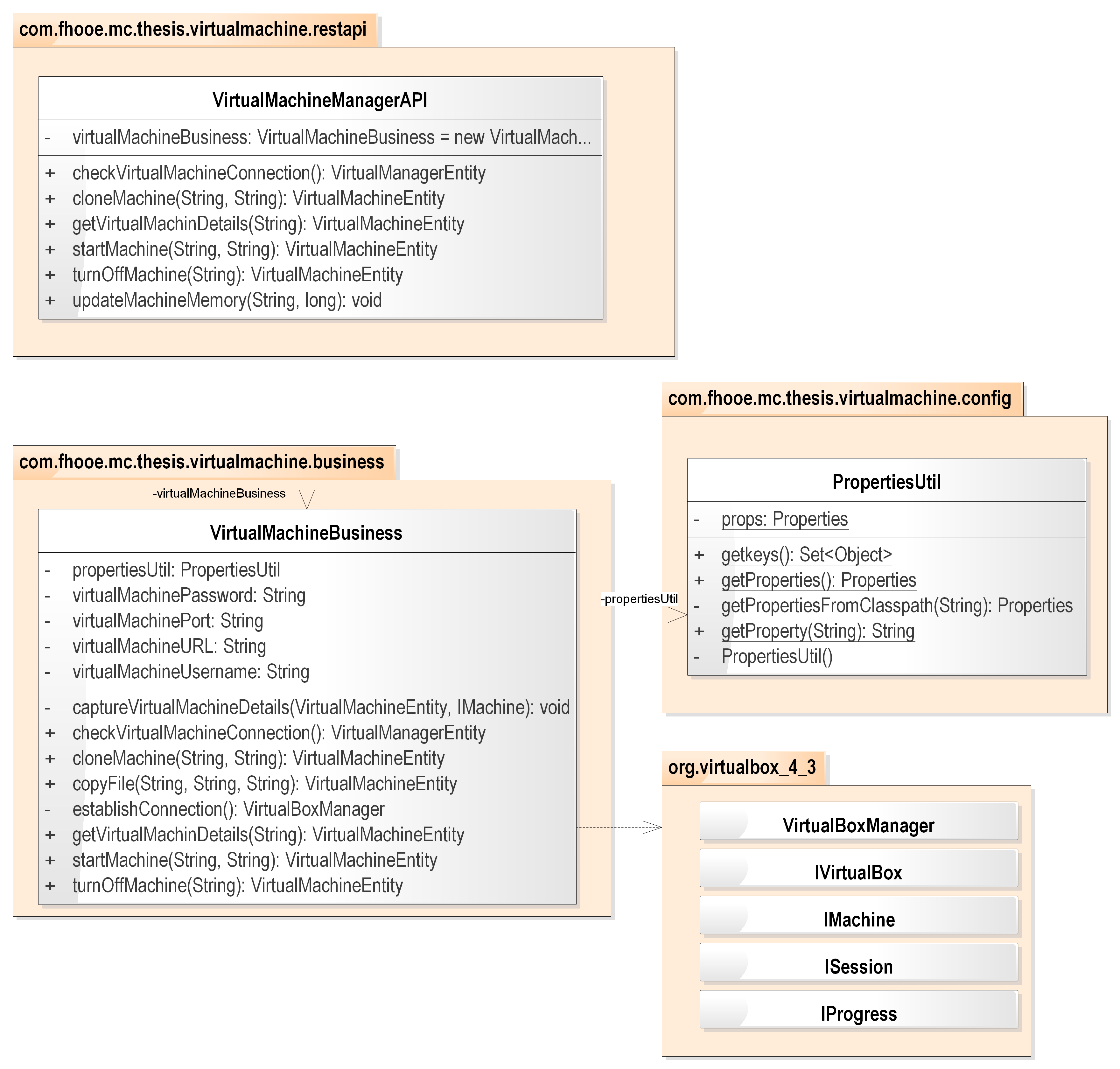 VM Management Component class diagram — the restapi package (Jersey endpoints) delegates to the business package which accesses IMachine and ISession interfaces from the VBox SDK for remote VM control
Code Execution
Copy source file into VM:
POST /vm/{name}/copyfile
Body: XML with source code details
Uses SSH to transfer a file into the running VM:
JSch jsch = new JSch();
Session sshSession = jsch.getSession(
    "user", vmIpAddress, 22
);
sshSession.connect();
ChannelSftp channel = (ChannelSftp) sshSession.openChannel("sftp");
channel.connect();
channel.put(localFilePath, "/vm-tools/input/program.xml");
Compile source code:
POST /program/compile
Body: { "vmName": "student-42" }
SSHs into the VM and invokes the utility JAR:
ChannelExec exec = (ChannelExec) sshSession.openChannel("exec");
exec.setCommand("java -jar /vm-tools/utility.jar compile");
exec.connect();
// read output stream for compilation results
Execute compiled code:
POST /program/execute
Body: { "vmName": "student-42" }
Same pattern — SSH into VM, run utility with execute flag, capture stdout/stderr.
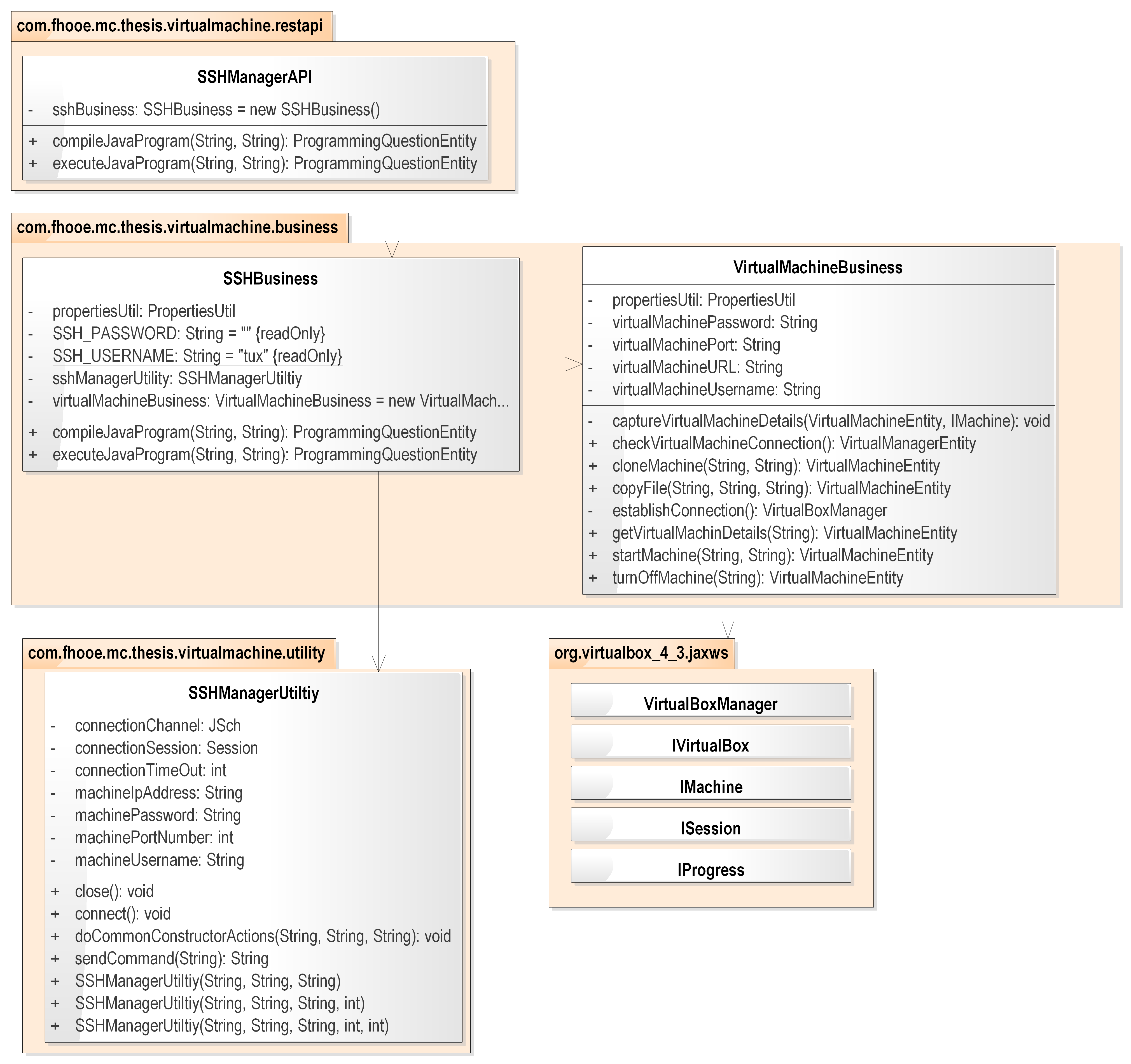 Programming Component class diagram — SSH-based classes responsible for copying source files into the VM and invoking the utility JAR to compile and execute Java code, separate from VM lifecycle management
Request and Response Format
All requests and responses use XML. The source code transfer format:
<programDetails>
  <className>BubbleSort</className>
  <sourceCode>
    public class BubbleSort {
        public static void main(String[] args) {
            int[] arr = {5, 3, 1, 4, 2};
            // student solution here
        }
    }
  </sourceCode>
  <action>COMPILE</action>
</programDetails>
Compilation result:
<compilationResult>
  <status>SUCCESS</status>
  <errors/>
</compilationResult>
Or on failure:
<compilationResult>
  <status>FAILURE</status>
  <errors>
    <error>
      <line>7</line>
      <column>12</column>
      <message>';' expected</message>
    </error>
  </errors>
</compilationResult>
Implementation Stack
The REST API is a standard Java web application:
- JAX-RS / Jersey for REST endpoints
- VirtualBox SDK (
vboxjws.jar) for VM control - JSch for SSH file transfer and remote command execution
- JAXB for XML marshalling/unmarshalling
- Tomcat as the application server
The war file deploys on any Tomcat instance. The VirtualBox instance can be on the same machine or a different server on the same network — the SDK connects via the vboxwebsrv URL.
What This Enabled
Once the REST API was running, the Moodle plugin could control the entire VM lifecycle through simple HTTP calls:
POST /vm/clone— provision a VM for this studentPOST /vm/{name}/start— boot itPOST /vm/{name}/copyfile— send the student's codePOST /program/compile— compile itPOST /program/execute— run it- Parse the XML result, assign a grade in Moodle
POST /vm/{name}/stop— shut it down
The Moodle plugin is completely decoupled from VirtualBox. It just makes HTTP calls and handles XML responses. This is the same abstraction pattern that AWS, Google Cloud, and Azure use for their compute APIs — a clean HTTP contract between the consumer and the infrastructure.
What Would Change Today
The same REST API pattern holds. What changes is the underlying implementation:
vboxjws.jar→ Docker Java SDK (docker-java)vboxwebsrv→ Docker Engine API (already HTTP-native)- SSH file transfer → Docker
CopyArchiveToContainerCmd - VM clone → Docker container from image
- XML format → JSON
The endpoint contract — clone, start, stop, execute, delete — maps directly to Docker container operations. Layer 4 (the Moodle plugin) would not change at all.